
ReadAnywhere
McGraw-Hill Global EducationBooks & Reference
3.31.04K Reviews
- Version
- 4.7.2
- Installs
- 500.00K
- Age Rating
- Everyone
Screenshots
Our Review of ReadAnywhere
 Analysis by Appyee
ReadAnywhere is the kind of app that makes sense only when you already use McGraw Hill Connect for your studies. I tested it with that role in mind: not as a general ebook reader, but as a mobile doorway to books connected to a Connect account. That distinction matters. If your textbooks live in that ecosystem, the app can turn spare moments into useful reading time. If you are looking for a broad library, a flexible PDF tool, or a replacement for a normal ebook store, this is probably not where I would start.
Developed by McGraw-Hill Global Education, this free Books & Reference app is aimed at Connect users who need to reach their course books away from a desk. Its age rating is Everyone, and the current release is version 4.7.2 for operating systems starting with version 10. The app has passed the point of being a niche experiment: it has more than 500 thousand installs, although its average rating is 3.3 from roughly 7 thousand ratings, with about 1 thousand written reviews. That mixed reception matches my overall impression: the idea is practical, but the experience depends heavily on how smoothly your Connect materials and account behave.
How I would use ReadAnywhere in a normal study week
I’d make ReadAnywhere part of a simple weekly rhythm rather than opening it only when a deadline is close: early in the week, I’d check which Connect book matches the upcoming class, then use brief sessions to revisit one section at a time. Keeping a note of the chapter and the question I want answered makes those short visits purposeful. That routine also makes it easier to spot whether a snag is about access, preparation, or the reading task itself.
The baseline workflow is simple, but account access comes first
The most sensible routine begins before you leave your desk. I would sign in through the McGraw Hill Connect relationship, identify the book needed for the next class or assignment, and make sure I can open the relevant material while I still have a reliable connection. This preparation is more important than it sounds. A mobile reader is only useful when the book is already associated with the correct account, so checking access early avoids discovering a login or course-enrollment problem five minutes before studying.
Once the book is available, I would use the app for focused reading rather than trying to recreate an entire desktop study session on a phone. A short bus ride, a waiting room, or the final ten minutes before a lecture are good examples. The screen is better suited to reviewing a section, refreshing terminology, or checking a passage than to handling every part of a large assignment. I found that this change in expectation makes ReadAnywhere feel much more useful.
A realistic everyday scenario is a student who has a textbook open on a laptop at home but needs to review one chapter before a morning class. Instead of carrying the physical book or opening a full browser session, the student can use the mobile app to continue reading from the Connect-linked material. The gain is not dramatic in one sitting, but repeated small sessions can reduce the amount of catching up needed later.
I would also keep the mobile routine separate from heavy note production. Reading on a phone is convenient, while writing a long outline, comparing several sources, or building a detailed citation list is usually easier on a larger screen. My preferred pattern is to read and mark mentally on the phone, then do the more demanding organization at a computer. That division prevents the app from being judged for a job it was not designed to perform.
What the app is good at for different kinds of readers
ReadAnywhere is strongest for students whose main need is continuity. If your textbook is already part of a McGraw Hill Connect course, the app can bridge the gap between scheduled study and the rest of the day. It is also useful for readers who dislike carrying printed textbooks and want a single place to return to assigned material. The free price removes one obvious barrier, though access to the actual books still depends on the Connect side of the experience rather than on the app acting as an independent bookstore.
I would recommend it more confidently to someone who studies in short bursts than to someone who reads entire textbooks on a phone. Short sessions benefit from immediate access; long sessions expose the limits of a smaller display, especially when a page contains dense diagrams, tables, or technical formatting. A tablet or computer may be the better choice for those chapters, with ReadAnywhere serving as the convenient companion rather than the only reading environment.
It is less suitable for a person who wants to import unrelated ebooks, read library titles, manage a personal PDF collection, or browse a large public catalog. Mainstream ebook apps are better at those tasks because they are built around broad personal libraries and consumer reading habits. ReadAnywhere has a narrower purpose, and that focus is helpful only if your books already fit it.
Settings and habits worth checking before serious reading
My first practical tip is to inspect the reading environment before starting a long session. Textbook pages can be visually busy, so I would adjust the device’s brightness and text display to match the room instead of leaving everything at a default level. I would also test portrait and landscape orientation with a diagram-heavy page. Portrait is usually comfortable for continuous text, while landscape can make wide tables or illustrations easier to inspect.
The second tip is to establish a repeatable place to stop. Rather than closing the app randomly, I would finish at the end of a subsection or after a clearly identifiable page and note the chapter in my study plan. This creates a dependable handoff between mobile and desktop reading. If a session ends in the middle of an argument or example, returning later is harder, particularly when the next task involves answering questions rather than simply reading.
Because this is a Connect-linked reader, I would verify the account before troubleshooting the reading screen. If a book appears to be missing, the useful questions are whether the correct Connect credentials are being used and whether the title belongs to that course relationship. Treating every access issue as an app display problem can waste time. In my experience, the most efficient habit is to separate account access, book availability, and page-reading behavior into three different checks.
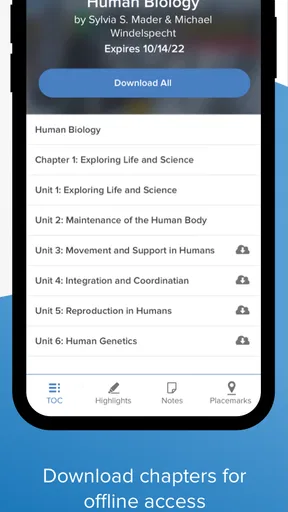
I would also avoid making a mobile session depend on a perfect signal. If I know I will be commuting or studying somewhere unreliable, I would open the needed material in advance and confirm that the pages I expect to use are ready for reading. I am deliberately framing this as a preparation habit rather than promising a particular offline system: the important lesson is to test the exact chapter before relying on it away from a connection.
The best improvement is often a routine, not a hidden feature. Open the book before leaving, identify one limited reading goal, use the most comfortable orientation, and finish at a clear stopping point. That sequence makes the app feel faster and more dependable without assuming tools that may not be available in every title or account.
Faster patterns for repeat users
After the initial setup, I would stop treating the app like a place to wander. A faster pattern is to decide the target before opening it: one definition, one subsection, a review of a previous chapter, or preparation for a specific class. This matters because mobile reading time is usually fragmented. A defined target reduces the temptation to scroll through a whole book looking for the right place.
Another useful pattern is to pair each mobile session with a later desktop action. For example, I might read a section on my phone during a break, then later turn that section into flashcards, a summary, or a list of questions on a larger screen. The app becomes the reading stage in a two-device workflow. That is more realistic than expecting a small screen to handle reading, research, writing, and submission all at once.
For revision, I would work backward from the next assessment or class topic. Open the relevant book, review the concepts most likely to matter, and leave broader reading for a longer session. This approach is especially helpful when the textbook is large. The app’s value comes from reducing the distance between “I should review this” and actually opening the assigned material.
I also recommend keeping a simple external study note with chapter names and the reason for each revisit. That is not a feature claim about ReadAnywhere; it is a workflow choice that compensates for the difference between reading access and full study management. A note such as “review the worked example before Thursday” is more useful than repeatedly reopening a book without a plan.
Experienced users should be careful not to confuse speed with shallow reading. The app can make a textbook available quickly, but technical subjects still require time to interpret diagrams, follow examples, and connect definitions. I would use short mobile sessions for reinforcement and retrieval, not as an excuse to skim material that needs careful concentration.
Where the mobile format reaches its limits
The biggest limitation is the narrow scope of the library relationship. ReadAnywhere is not a universal reading shelf. Its usefulness begins with McGraw Hill Connect access, so it cannot replace a general ebook service for someone whose books come from several publishers. That trade-off is fair, but it should be understood before installing the app. A free download does not turn every digital textbook into a compatible title.
The phone itself creates another limit. Dense academic pages often combine paragraphs, sidebars, equations, captions, and diagrams. Even when the text is readable, moving between those elements can be less comfortable than using a printed book, tablet, or desktop browser. I would not choose this app as my only format for a subject where visual comparison is constant.
There is also a difference between having access to reading material and having a complete academic toolkit. A student may still need a browser for course tasks, a separate note-taking app for analysis, and a computer for writing. ReadAnywhere helps with the first part of that chain, but it does not remove the need for the other parts. That is not a flaw so much as a boundary that becomes frustrating when expectations are too broad.
The average rating of 3.3 suggests that convenience is not the whole story for users. I would interpret that cautiously rather than treating the number as a final verdict. A reader with a stable Connect account and a straightforward need may have a better experience than someone trying to solve an account, course, or device problem through the reader alone. The app’s success depends on the surrounding educational setup more than a typical standalone ebook app’s success does.
For that reason, I would skip ReadAnywhere if I have no McGraw Hill Connect course, if I need a broad collection of independent books, or if my main priority is advanced annotation and research across multiple sources. In those cases, a general ebook reader, a library app, or a desktop-first academic workflow is likely to be more suitable. I would also choose a larger screen when the assigned material contains many wide illustrations or complex tables.
My verdict after building a repeatable workflow
ReadAnywhere is a focused companion for people who already live inside McGraw Hill Connect. I like its central idea because it addresses a real problem: assigned reading does not stop being useful just because I have left my desk. The app makes those in-between moments more productive, especially when I prepare the book beforehand and give each session a clear purpose.
My recommendation is therefore conditional but positive. If your Connect books are available, you want mobile access, and you are comfortable combining the app with a computer for deeper work, it is worth trying because it is free and aimed directly at that situation. The Everyone rating also makes it broadly approachable from an age-content perspective.
I would not present it as a replacement for printed textbooks, a full desktop course platform, or a universal ebook library. Its best role is smaller and more practical: keep the right academic book close, use short windows of time intelligently, and return to a larger screen when the work becomes complex. Once I treated it that way, the limitations felt manageable rather than surprising.
Ultimately, ReadAnywhere rewards users who build habits around it. Check access early, prepare the material before going offline or commuting, choose the right screen orientation, and connect mobile reading to a later study task. If that workflow matches your course, this app can become a useful part of the week. If it does not, the familiar alternatives will probably serve you better.
Verdict
Strengths of ReadAnywhere
- Works offline after books are downloaded
- Simple interface makes reading comfortable
- Supports multiple ebook formats
- Reading progress syncs across devices
- Customizable font size, theme, and margins
Limitations of ReadAnywhere
- Some features may require a paid subscription
- Book availability depends on the selected library
- Large downloads can consume significant storage
- Syncing may be unreliable with a weak connection
- Limited tools for advanced readers and annotations
Other Releases by McGraw-Hill Global Education
View All
Sharpen – College Exam Prep
Education4.2
Similar Picks in This Category
View All
Google Play Books & Audiobooks
Google LLC4.7

네이버 - NAVER
NAVER Corp.3.5

Wattpad - Read & Write Stories
Wattpad.com3.7

King James Bible - Verse+Audio
Ozion4.8

Bible Offline-KJV Holy Bible
Bíblia Offline4.9

Amazon Kindle: Reading App
Amazon Mobile LLC4.8
Frequently Asked Questions
What is ReadAnywhere, and what can I use it for?
ReadAnywhere is a reading app designed to let users access digital books and other supported reading materials from a mobile device. After signing in through a compatible library or service, you can browse available titles, borrow or open content, and read it on your phone or tablet. Its usefulness depends on the catalog and access provided by your participating institution.
Do I need a library account or subscription to use ReadAnywhere?
In most cases, ReadAnywhere requires access through a participating library, school, or digital reading service. You may need a valid library card, institution login, or account credentials before you can borrow and read titles. The app itself may be free to install, but availability of books and other content is controlled by the organization providing the service.
Can I read books offline with ReadAnywhere?
ReadAnywhere can support offline reading for content that has been downloaded to your device, which is useful when traveling or when you have limited internet access. You normally need to be online initially to sign in, borrow or open a title, and download it. Offline availability may vary by publisher restrictions, loan period, device storage, and the type of content.
What devices and operating systems are compatible with ReadAnywhere?
ReadAnywhere is intended for mobile devices running supported versions of Android or iOS, although exact compatibility can change as the app is updated. Before downloading, check the application store listing for the current operating-system requirements and available storage. Older phones or tablets may install the app but provide a slower experience or lack certain features.
Are there any limitations when borrowing or reading titles in ReadAnywhere?
The main limitations usually come from the library or service connected to ReadAnywhere rather than from the app itself. Some popular titles may have waiting lists, limited digital copies, borrowing limits, or fixed loan periods. Publisher permissions can also restrict copying, printing, or transferring content. When a loan expires, access may end automatically unless you borrow the title again.
